
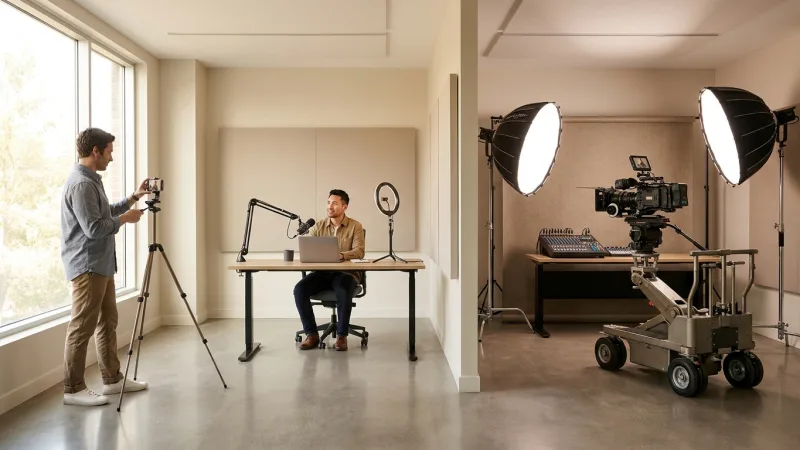
L&D teams often invest around 30 hours to craft just 20 minutes of training video content. But here’s a revelation: some of the best training videos are produced with minimal budgets. The secret? A strategic approach that emphasizes impact over costly equipment. Are you wasting hours and money on ineffective training video production? Today, you’ll discover how to create high-quality training videos across three budget tiers, $0, $500, and $5000+, with specific tool recommendations, cost breakdowns, and ROI calculations for each approach.
The Real Cost of Poor Training Videos (And Why Budget Doesn’t Determine Quality)
Employee engagement plummets by 67% when training videos are of poor quality. The consequence? A decline in learning outcomes and increased costs for retraining. But here’s the kicker: high production costs don’t translate into high-quality training videos. What truly matters are factors like content relevance, engagement strategies, and audio clarity.
Consider the cost of re-training due to ineffective videos. If your team has to repeat training because the video didn’t resonate, you’re not just spending extra hours, you’re losing potential revenue. Let’s compare the ROI across different budget levels.
| Budget Level | Initial Cost | Effectiveness Score (1-10) | Cost per Effective Hour |
| $0 | $0 | 7 | $0 |
| $500 | $500 | 8 | $62.50 |
| $5000+ | $5000 | 9 | $555.56 |
The table above highlights how judicious spending can improve effectiveness without necessarily inflating the budget. Focusing on engagement and interactivity can drastically improve the ROI of your video content. Explore more on creating engaging content with our Video Learning Production Tips.
The 3-Tier Video Production Framework: $0, $500, and $5000+ Budgets
Creating quality training videos doesn’t have to break the bank. Our 3-Tier Video Production Framework allows you to choose a budget level that suits your needs while maximizing the impact and quality of your training videos.
$0 Budget Tier
This tier demonstrates that effective training videos are possible with zero investment. Using free tools and a smartphone, you can produce professional-looking content that captivates your audience.
$500 Budget Tier
For teams ready to improve their video quality and efficiency, the $500 investment tier offers a semi-professional setup. Essential purchases in this tier yield a significant return on investment by saving editing time and improving video clarity.
$5000+ Budget Tier
Organizations producing high volumes of training content may find the $5000+ tier beneficial. This budget allows for enterprise-grade production setups that scale effectively as your content demands grow.
| Budget Tier | Tools/Equipment | Expected Quality | Production Timeline |
| $0 | OBS, DaVinci Resolve, Canva, Smartphone | Good | 1-2 Days |
| $500 | External Microphone, Lighting Kit, Video Editing Software | Very Good | 1 Day |
| $5000+ | Professional Camera, Audio System, Editing Suite | Excellent | Less than a Day |
This strategic framework helps you decide when to evolve your video production process as your needs and resources change. For detailed strategies to improve learning outcomes, explore our LXD Framework.
$0 Budget Tier: Professional Results with Free Tools and Smartphone
Think you need a hefty budget for professional video results? Think again. With the right approach, free tools, and techniques, you can produce engaging content that rivals higher-budget productions.
Complete Free Tool Stack
- OBS for screen recording.
- DaVinci Resolve for video editing.
- Canva for graphics and thumbnails.
- Smartphone with a decent camera.
Smartphone Filming Techniques
Use your smartphone wisely to achieve a polished look. Keep it steady, use natural lighting, and film in a quiet space. These simple tweaks can improve your video quality significantly.
Free Audio and Lighting Solutions
- Record in a small room to reduce echo.
- Use desk lamps for additional lighting.
- Edit sound using free audio tools like Audacity.
Following these steps can help you craft quality training videos without financial investment. Dive deeper into creating personalized learning content with our guide on Personalized Learning Paths.
$500 Budget Tier: Semi-Professional Setup That Scales
Transitioning to a $500 budget can significantly improve your production quality and efficiency. This tier offers an optimal balance of cost and output, perfect for teams aiming to step up their game.
Essential Equipment Purchases
Investing wisely in a few key items can greatly impact your video quality.
- External Microphone: $100
- Lighting Kit: $150
- Video Editing Software (one-time purchase): $250
Software Upgrades
While free tools are beneficial, investing in paid software can save you countless editing hours, thus speeding up your workflow.
When This Tier Makes Sense
If your team anticipates frequent video production or requires higher quality, the $500 tier is a smart investment. Consider the ROI in terms of time saved and improved learning outcomes.
A calculator showing the time savings and ROI can shed light on this tier’s effectiveness.
| Equipment/Tool | Cost | Time Saved (per project) | ROI Time Frame |
| External Microphone | $100 | 2 Hours | 2 Projects |
| Lighting Kit | $150 | 3 Hours | 1 Project |
| Video Editing Software | $250 | 5 Hours | 1 Project |
Step up your production capabilities and understand when to invest more by exploring our Blended Learning Strategy.
$5000+ Budget Tier: Enterprise-Grade Production Systems
For large organizations with substantial training needs, investing in a $5000+ budget tier can equip you with enterprise-grade tools to produce exceptional content at scale.
Professional Camera and Audio Setups
- HD Camera (Canon EOS 5D Mark IV): $2500
- Professional Audio Mixer: $1200
- High-Quality Wireless Microphones: $800
Automated Workflow Systems
Investing in systems that automate repetitive tasks can further improve your production process, reducing the need for large editing teams.
Multi-Camera and Studio Configurations
Large-scale production often requires a multi-camera setup to capture different angles and maintain viewer engagement. A studio setup includes everything from green screens to professional lighting rigs.
This budget tier supports scalability, making it ideal for companies anticipating rapid growth or increased content demand. For insights into flexible content production, refer to our article on AI Personalized Learning Paths.
The 15-Minute Video Production Workflow (Works at Any Budget Level)
Simplifying your production process can drastically reduce time wastage. Implementing a 15-minute workflow helps eliminate common production bottlenecks.
Pre-production Checklist
- Confirm script and storyboard.
- Test equipment and software.
- Set up lighting and sound checks.
Recording Techniques
Practical recording techniques ensure quality output. Consider one-take success strategies and cue cards to maintain smooth delivery.
Post-Production Shortcuts
Use keyboard shortcuts in editing software to accelerate the post-production phase. Moreover, templates can simplify repetitive tasks.
The following template illustrates a time-efficient production workflow:
| Production Stage | Time Allocation | Efficiency Tips |
| Pre-production | 5 Minutes | Use templates for quick setups. |
| Recording | 5 Minutes | Focus on one-take strategies. |
| Post-production | 5 Minutes | use shortcuts in software. |
To deepen your understanding of simplified production and personalized learning integration, visit our guide on Building Personalized Learning Paths.
Measuring Training Video Success: Analytics and Improvement Framework
Creating the video is only half the battle. Measuring its effectiveness is crucial to ensure your efforts translate into real training success.
Key Metrics to Track
- Engagement Rate: Are viewers engaged throughout?
- Knowledge Retention: Are learning objectives met?
- Completion Rate: Are learners finishing the videos?
A/B Testing Strategies
Implement A/B tests on different video formats, lengths, and content types to discern what resonates best with your audience.
Continuous Improvement Process
Use feedback and analytics to refine content continuously. Establish benchmarks to measure video success and iterate on aspects that underperform.
Here’s a dashboard template to track video analytics effectively:
| Metric | Target Value | Current Value | Action |
| Engagement Rate | 75% | 60% | Revise Content |
| Knowledge Retention | 80% | 70% | improve Interaction |
| Completion Rate | 90% | 85% | improve Length |
Embrace an iterative approach to video production with insights from our article on E-Learning Standards.
Frequently Asked Questions
How to produce training videos on a tight budget?
Producing training videos on a tight budget is achievable with free tools like OBS and DaVinci Resolve and your smartphone. Focus on maximizing natural light and reducing audio distractions for best results.
What are the best tools for learning video production?
The best tools vary with your budget. For no-cost solutions, consider OBS for recording and DaVinci Resolve for editing. Mid-range budgets benefit from software like Adobe Premiere Pro and external microphones for improved quality.
How long should training videos be for maximum engagement?
The optimal length for training videos is typically between 5-10 minutes, aligning with the average attention span. Keeping content concise increases viewer engagement and retention.
What’s the ROI of investing in better video production equipment?
Investing in better equipment can significantly boost video quality and production speed, improving learning outcomes and reducing long-term costs. Calculating ROI involves evaluating time saved and training effectiveness improvements.
Ready to change your video learning production? Start today by selecting a budget tier and exploring further with our Next-Gen Personalized Learning Platforms. As the market shifts, the demand for adaptable and compelling content will only grow. Equip your team to meet these demands confidently.