
Buying an LMS for 200 employees is one thing. Buying one for a global organization with thousands of learners, multiple business units, external partners, compliance requirements, and a crowded tech stack is another.
That’s where high-end LMS platforms come in.
An enterprise LMS isn’t simply a bigger version of a basic learning platform. It needs to handle organizational complexity without turning every new learner, course, integration, or compliance report into a mini IT project.
What Makes an LMS “High-End”?
A high-end LMS isn’t necessarily the platform with the highest price or longest feature list.
For enterprise organizations, it is a platform that can handle scale, integrations, security, automation, analytics, and multiple learning audiences without creating excessive administrative work.
Current enterprise LMS guidance from Intellum emphasizes requirements such as integrations, APIs, AI capabilities, scalability, and structured evaluation.
The more useful measure is how much organizational complexity the LMS can absorb without creating more work for the team.
That should be the starting point for an enterprise LMS evaluation.
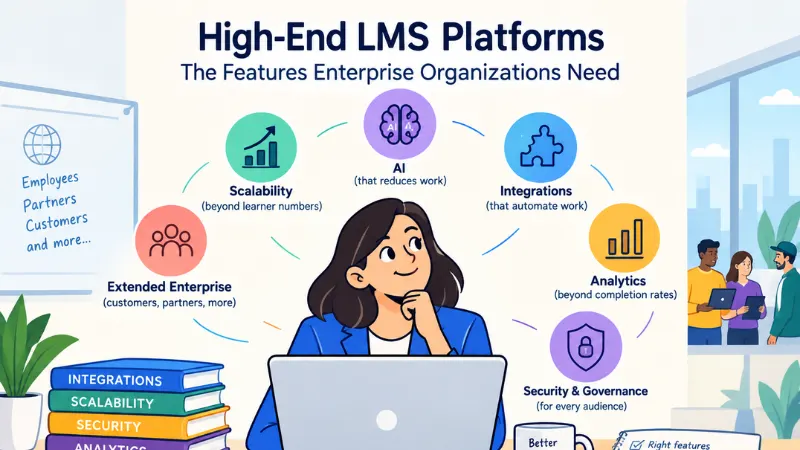
5 Features High-End LMS Platforms Need
1. Scalability Beyond Learner Numbers
Enterprise scale isn’t just about supporting thousands of users.
A global organization may need different learning experiences for sales, engineering, leadership, contractors, customers, and channel partners. Those groups can also span regions, languages, business units, and compliance requirements.
Look for:
- Multi-language and localization support
- Multiple audiences or business units
- Role-based permissions
- Automated enrollment
- Flexible learning paths
- Centralized administration
- Support for high-volume usage
Scalability also needs to account for how the platform handles different audiences and organizational structures. It is worth defining those requirements before comparing products rather than treating user capacity as the only measure of scale.
A platform can support a large learner base and still leave administrators with significant manual work. As organizations scale, user provisioning, training assignments, certifications, integrations, and reporting can create additional administrative overhead without the right automation. Gyrus’ overview of LMS administration challenges highlights these issues across growing enterprise learning environments.
2. Integrations That Actually Automate Work
A high-end LMS shouldn’t become another island in your software stack.
Enterprise LMS platforms may need to connect with Human Resource Information System (HRIS), Customer Relationship Management (CRM), identity, collaboration, analytics, and other learning systems. Open interoperability standards can reduce the need for one-off connections. For example, 1EdTech’s LTI standard supports secure connections between learning platforms and external tools, including the exchange of user and role information.
The value of an integration comes down to the work it removes.
An employee changes roles in the HRIS. Their learning requirements update automatically.
A certification is approaching expiry. The appropriate reminder is triggered.
A manager needs a compliance report. The information is already available.
That is the difference between an LMS that connects systems and one that automates workflows.
3. AI That Reduces Work, Not Just Adds Hype
AI is now part of the enterprise LMS conversation, but “AI-powered” can mean almost anything.
Useful capabilities may include:
- Personalized learning recommendations
- AI-assisted content creation
- Skills and competency mapping
- Intelligent search
- Automated learner nudges
- Adaptive learning paths
- AI-supported assessments
Enterprise learning platforms are already using AI for tasks such as learner assistance, content creation, search, and personalized recommendations. Thought Industries’ current AI capabilities provide one example of how these features are being built into learning environments.
The useful part of an AI feature is what happens to the workload around it. A vendor demonstration should show whether AI can reduce administrator effort, identify relevant learning, support content creation, surface skills gaps, or automate follow-up.
If the AI simply recommends another course while administrators still complete the same manual steps afterward, the value wears off quickly.
4. Analytics That Go Beyond Completion Rates
Completion rates are useful. They just aren’t enough for enterprise L&D.
Organizations increasingly need to understand whether learning connects with outcomes such as employee performance, compliance, productivity, customer adoption, or time to competency.
Look for:
- Custom dashboards
- Competency tracking
- Advanced reporting
- Exportable learning data
- Business intelligence integrations
- Audit-ready reports
- Role- and audience-level reporting
Learning analytics can become considerably more useful when organizations connect learning activity with wider business data rather than treating the LMS as an isolated reporting system. Recent L&D analytics research and guidance highlights this gap between the activity an LMS records and the business questions leadership actually needs answered.
The basic report answers: Who completed the training?
A stronger analytics setup can help answer what happened afterward and whether the learning contributed to a meaningful business outcome.
That distinction becomes important when L&D needs to demonstrate business value rather than simply report activity.
5. Security, Governance, and Multiple Learning Audiences
Enterprise LMS platforms can store employee information, learning records, certifications, assessment results, and sensitive business content. Security therefore needs to be a buying requirement, not a footnote.
Depending on your organization, evaluate:
- Single Sign-On (SSO)
- Multi-factor authentication
- Role-based access
- Encryption
- Audit logs
- Data retention controls
- Data residency options
- Relevant security certifications
Identity and access management is particularly important as the LMS becomes part of the wider enterprise technology environment. Cornerstone’s current LMS security guidance covers controls such as SSO, Multi-Factor Authentication (MFA), and role-based access.
Accessibility belongs in the same broader governance conversation. The W3C’s guidance for accessible LMSs specifically addresses accessibility for LMS users and the content they create.
The picture also changes when people outside the workforce need training.
Customers, partners, resellers, distributors, and franchisees may need access to learning too.
This is where extended enterprise learning becomes valuable. Platforms designed for this use case can support different audiences, portals, permissions, and learning journeys from a shared environment. Platforms such as Thought Industries support extended enterprise learning for customers, partners, and other external audiences.
If external education is part of your strategy, it should be considered before the LMS is selected. An employee-focused LMS may not translate neatly into a customer academy later.
What Enterprise LMS Buyers Should Compare
Once you’ve identified the features you need, compare platforms against the realities of your organization, not just vendor checklists.
| Area | What to compare |
| Scalability | Users, regions, business units, languages, and future growth |
| Integrations | HRIS, CRM, identity, analytics, and existing workflows |
| AI capabilities | Personalization, content creation, automation, and skills intelligence |
| Analytics | Reporting depth, dashboards, data exports, and business insights |
| Security | SSO, permissions, audit logs, certifications, and data governance |
| Accessibility | Web Content Accessibility Guidelines (WCAG)/Authoring Tool Accessibility Guidelines (ATAG) considerations, accessible content creation, and learner access |
| External learning | Customer, partner, reseller, or other non-employee audiences |
| Administration | Automation, ease of use, implementation, and ongoing support |
| Total cost | Licensing, implementation, integrations, customization, and maintenance |
The important part is how each platform performs against your requirements.
A vendor may have 100 features on paper, but if your team needs five of them and spends hours every week managing the other workflows manually, that feature count isn’t doing much for you.
Build your shortlist around operational fit, not feature volume.
Don’t Forget the Most Expensive Feature: Administration
A powerful LMS can still be a poor enterprise purchase if every workflow requires specialist support.
The evaluation should cover:
- How much user management can be automated?
- Can administrators create reports without IT?
- How easily can permissions be changed?
- Can subject matter experts update content themselves?
- What does implementation actually require?
- How much customization will be needed?
- Who provides support when something goes wrong?
This is where total cost of ownership matters.
The license isn’t the entire bill. Implementation, migration, integrations, customization, content creation, technical support, and administrator time can all affect the real cost.
Sometimes the most expensive LMS is simply the one that quietly creates another full-time job.
How Should You Evaluate a High-End LMS?
Don’t evaluate platforms only by watching vendors click through polished dashboards.
Test them against real workflows.
A useful vendor demonstration should cover scenarios such as:
- A new employee joins. How are they provisioned and assigned learning?
- An employee changes roles. What happens to their learning requirements?
- A certification expires. Can reminders and reassignment happen automatically?
- A customer or partner needs training. Can they access an appropriate learning environment?
- A manager needs a compliance report. Can they generate it without IT?
These scenarios reveal something a feature checklist often misses: how the LMS behaves when real organizational complexity enters the room.
For formal procurement, requirements should also be translated into measurable criteria. 1EdTech’s LTI procurement guidance provides an example of how technical requirements can be incorporated into an LMS RFP.
Which High-End LMS Is Right for Your Organization?
There isn’t one universally best enterprise LMS.
A company focused on employee development may prioritize HR integration, skills management, performance data, and internal mobility.
A software company running a customer academy may care more about external access, branded portals, product training, and customer adoption.
A regulated organization may put security, auditability, and certification management first.
The starting point is the organization’s own operating model:
- Who are we training?
- Which systems must the LMS connect to?
- What should our L&D team be able to automate?
- Where is administration creating the most work today?
- Which business outcomes need to be measured?
- Do we need to support external audiences?
Each platform can then be evaluated against those requirements.
The best high-end LMS isn’t necessarily the one with the longest feature list. It’s the one that removes the most operational friction while giving your organization better visibility into whether learning is actually working.
For organizations also evaluating the wider learning technology stack, the same principle applies when comparing an LMS with virtual classroom platforms and their business requirements. The tools need to work together rather than create another disconnected layer.
Final Takeaway
The enterprise LMS market has moved well beyond uploading courses and tracking completion.
Today’s high-end LMS platforms need to connect learning with the rest of the organization through scalable delivery, automation, integrations, security, analytics, accessibility, and support for the audiences you actually need to train.
The smartest purchase isn’t necessarily the LMS with the longest feature list.
It’s the one that makes enterprise learning easier to operate and easier to prove.
Map your workflows, integrations, audiences, and business outcomes first. Then make the LMS earn its place in the stack.
Frequently Asked Questions (FAQs)
What makes an LMS enterprise-ready?
An enterprise-ready LMS should support complex user structures, multiple audiences, integrations, security and governance requirements, advanced reporting, automation, accessibility, and potentially global or extended-enterprise learning.
What should an enterprise LMS RFP include?
An enterprise LMS RFP should cover functional requirements, integrations, security, reporting, AI capabilities, implementation, support, accessibility, data governance, scalability, and total cost of ownership. It should also include real workflows the LMS must support.
What hidden costs should you consider when buying an enterprise LMS?
Look beyond the license price. Implementation, data migration, integrations, customization, content creation, administrator time, technical support, additional modules, and future scaling can all affect total cost of ownership.
Is a more expensive LMS always better?
No. A higher price does not guarantee a better fit. An organization can end up paying for capabilities it never uses, while a simpler platform may meet its requirements with less administrative overhead. Compare total cost, implementation effort, integrations, support, and actual business requirements.